2-in-1 Laptops: Convertible Devices for Students and Professionals 📚💼
The global 2-in-1 laptop market is poised for steady growth, with a projected CAGR of 5.6% from 2026 to 2032—expanding from
412billionin2025tonearly605 billion by 2032. This surge is driven by dual demand: students seeking versatile tools for learning, and professionals needing portable, productivity-focused solutions. In 2026, 12-14 inch models dominate with over 55% market share, while industry leaders—Apple (25% share), HP (15%), Microsoft (10%), Lenovo (10%), and ASUS (5%)—collectively capture more than 65% of global revenue.
2026 marks a transformative year for 2-in-1 innovation: AI PC adoption nears 45%, OLED displays become standard in mid-range models, and stylus technology delivers paper-like precision. Yet users face distinct tradeoffs: students prioritize affordability and all-day battery life, while professionals demand robust performance and color-accurate displays. Below, we break down core technologies, top 2026 models, and tailored guidance to help you find the perfect convertible laptop for your academic or career journey.
I. Core Technology: Key Innovations & 2026 Breakthroughs ⚙️
2-in-1 laptops merge laptop versatility with tablet mobility, built around six defining technologies—convertible design, processing power, stylus integration, display quality, battery efficiency, and portability. Here’s how 2026’s offerings elevate these essentials:
1. Convertible Design: 3 Modes, 1 Device 🌀
| Design Type | Flip (360° Hinge) | Detachable (Tablet + Keyboard) | Rotatable (Screen Swivel) |
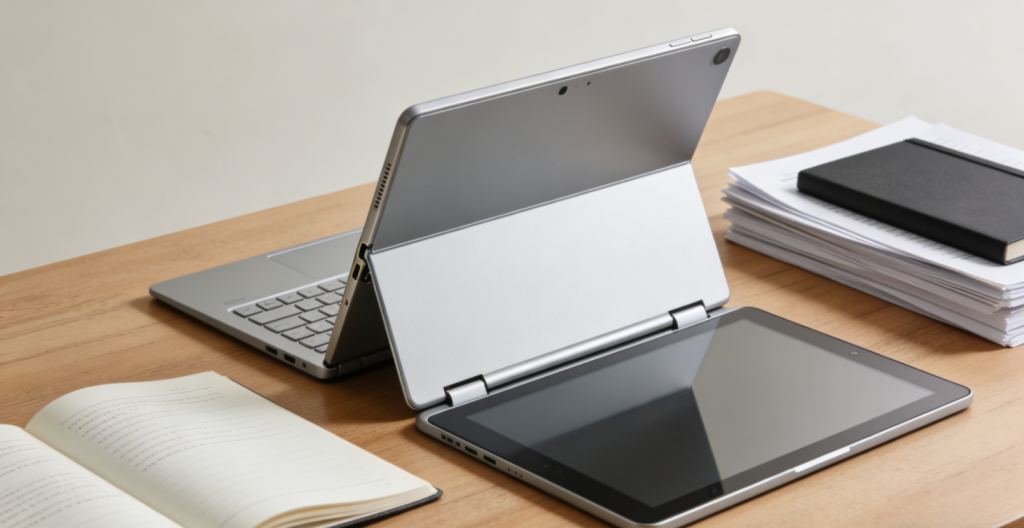
| Mechanism | Flexible hinge enabling laptop/tablet/tent modes | Removable keyboard base for standalone tablet use | 180° swivel screen with fixed keyboard |
| Examples | Lenovo Yoga 9i 2026, HP Spectre x360 16 | Microsoft Surface Pro 11, ASUS CM3206 Chromebook | Dell XPS 13 2-in-1, ASUS ZenBook Flip 14 |
| Best For | Professionals (multitasking), students (note-taking + typing) | On-the-go users, artists (tablet-focused workflows) | Balanced productivity + casual use |
| Pros | No loose parts, full-size keyboard access | Ultra-lightweight in tablet mode, versatile form factor | Durable build, seamless mode switching |
| Cons | Bulkier than detachables | Keyboard may feel flimsy; easy to misplace | Limited angle flexibility vs. flip models |
2. Processing & AI: Efficiency Meets Intelligence 🧠
- Processors: 2026 2-in-1s feature three core chipset tiers, tailored to user needs:
- Entry-level: MediaTek Kompanio 540 (2.6GHz, 4 cores) – ideal for students’ note-taking, web browsing, and online classes
- Mid-range: Intel Core Ultra 5 (10 cores, 15-28W TDP) or AMD Ryzen 7 Strix Point – balances performance and battery life for professionals juggling meetings, documents, and light creative work
- Premium: Apple M4 Pro (16-core) or Intel Core Ultra 9 (16 cores) – powers intensive creative tasks (video editing, 3D modeling) and heavy multitasking
- AI Capabilities: On-chip NPUs (Neural Processing Units) deliver user-specific tools that save time and enhance productivity:
- Student-focused: Real-time note transcription, language translation, and AI-assisted study schedule optimization (e.g., prioritizing assignments based on deadlines)
- Professional-focused: AI-powered video editing (auto-trimming, color correction), background blur for video calls, and smart battery management (extends runtime by 15-20%)
- Memory: 16GB LPDDR5X (6400MHz) as standard for smooth multitasking; 32GB options available for running design software, virtual meetings, and multiple browser tabs simultaneously.
3. Stylus Technology: Precision for Creators & Learners ✍️
- 2026 Innovations: Lenovo’s dynamic sampling stylus adjusts sensitivity based on writing speed, simulating paper-like friction via built-in vibration motors. Top models support 4096+ pressure levels, 2ms latency, and tilt detection—eliminating lag for natural writing and drawing.
- Key Features for Users:
- Students: Digital highlighter, AI-powered math equation solving (instantly works through problems), and instant handwritten-to-text conversion (cuts down on typing notes)
- Professionals: Precision drawing (for designers), secure signature authentication (for contracts), and PDF annotation (critical for client feedback and markup)
- Notable Styluses: Microsoft Surface Slim Pen 4 (magnetic charging, haptic feedback), Lenovo Active Pen 4 (built-in eraser, palm rejection), Apple Pencil 3 (hover detection for previewing tools).
4. Display Quality: Productivity & Immersion 🖥️
- Entry/Mid-Range: 12-14 inch IPS/OLED (2.5K, 60-120Hz) with 100% sRGB color gamut—perfect for note-taking, document work, and online lectures. ASUS CM3206 features a 12.1-inch 120Hz OLED (2560×1600) with 600 nits brightness, ensuring visibility in bright classrooms or coffee shops.
- Premium: 14-16 inch 4K OLED (120Hz) with 100% DCI-P3 color gamut and ΔE < 2 accuracy—essential for photo/video editing and design work where color precision matters. HP Spectre x360 16 offers VESA DisplayHDR True Black 1000 certification for deep blacks and vibrant colors, ideal for professional content creation.
- Durability: Corning Gorilla Glass protection is standard across most models, safeguarding against accidental drops and scratches—critical for students carrying devices in backpacks or professionals on the go.
5. Battery Life & Portability: All-Day Use Anywhere ⚡
- Battery Capacity: 42Wh-80Wh batteries, optimized for different user needs:
- Students: 8-12 hours of use (web browsing, note-taking, video streaming) – ASUS CM3206’s 42Wh battery lasts 9 hours on a single charge, covering back-to-back classes
- Professionals: 6-10 hours (video editing, video calls, design work) – Lenovo Yoga 9i’s 75Wh battery delivers 8 hours of productivity, enough for full workdays without charging
- Charging: 65W fast charging (50% battery in 30 minutes) is standard; premium models support 100W USB-C charging for quick top-ups between meetings or classes.
- Portability Metrics:
- Detachables: 0.64-0.9kg (tablet only) – ASUS CM3206 weighs just 0.64kg, light enough for daily campus carry or commutes
- Flip Models: 1.2-1.8kg – Lenovo Yoga 9i weighs 1.4kg, balancing portability and performance for professionals on the move
II. Top 2026 2-in-1 Laptops: For Students & Professionals 🏆
A. Best for Students 📝
1. ASUS Chromebook Detachable CM3206 (Best Budget) 💰
- Specs: 12.1-inch 2.5K OLED (120Hz), MediaTek Kompanio 540, 8GB LPDDR5X, 128GB eMMC, 42Wh battery (9 hours), 0.64kg (tablet).
- Key Features: MIL-STD 810H military-grade durability, 2x 5MP cameras (for clear online classes), Wi-Fi 6, Bluetooth 5.4, spill-resistant keyboard.
- Price: $499.99.
- Pros: Ultra-lightweight for daily campus carry, affordable (fits student budgets), all-day battery life, durable design that withstands school environments.
- Cons: Limited internal storage (easily expandable via microSD), ChromeOS learning curve for Windows users.
- Best For: K-12 and community college students (note-taking, online classes, light productivity tasks like Google Docs or Canvas).
2. Microsoft Surface Pro 11 (Best Windows Student Laptop) 💻
- Specs: 13-inch 2.8K LCD (120Hz), Intel Core Ultra 5, 16GB LPDDR5X, 256GB SSD, 54Wh battery (10 hours), 0.89kg (tablet).
- Key Features: Surface Slim Pen 4 support (for note-taking/annotations), Windows 11 Home, 1080p webcam with Windows Hello (fast, secure login), built-in kickstand.
- Price: $999.99.
- Pros: Versatile detachable design (tablet for lectures, laptop for essays), seamless stylus integration, 16GB RAM for multitasking (Zoom + textbooks + writing tools), Windows compatibility for software like Excel or MATLAB.
- Cons: Keyboard sold separately ($199), heavier than Chromebook alternatives.
- Best For: College students (liberal arts, STEM, or pre-professional programs) needing Windows for academic software and multitasking.
B. Best for Professionals 💼
1. Lenovo Yoga 9i 2026 (Best All-Rounder) 🌟
- Specs: 14-inch 4K OLED (120Hz), Intel Core Ultra 7, 32GB LPDDR5X, 1TB PCIe 5.0 SSD, 75Wh battery (8 hours), 1.4kg.
- Key Features: 360° flip design (laptop/tent/tablet modes), Lenovo Active Pen 4 (built-in charging), Harman Kardon speakers (clear meeting audio), 5G connectivity (reliable remote work), AI noise cancellation.
- Price: $1,799.99.
- Pros: Stunning 4K OLED display (great for presentations), powerful performance for multitasking, military-grade durability, AI productivity tools (background blur, meeting transcription).
- Cons: Premium pricing, heavier than detachables but manageable for commutes.
- Best For: Remote workers, marketers, project managers, and mid-level creative professionals (graphic design, social media content).
2. Apple MacBook Neo (Best for macOS Ecosystem) 🍎
- Specs: 13.6-inch Liquid Retina OLED (120Hz), Apple M4 Pro (12-core), 32GB RAM, 512GB SSD, 68Wh battery (11 hours), 1.1kg.
- Key Features: macOS Sequoia (seamless app integration), MagSafe 3 (safe charging, no cable snags), Thunderbolt 5 (fast external device connectivity), Apple Pencil 3 support, 18-core Neural Engine (AI tasks).
- Price: $1,999.99.
- Pros: Silent operation (no fan noise in meetings), seamless Apple ecosystem sync (iPhone/iPad/Apple Watch), all-day 11-hour battery, vibrant OLED display for design and content creation.
- Cons: Limited Windows compatibility, expensive storage upgrades.
- Best For: Designers, writers, editors, and Apple ecosystem users relying on tools like Final Cut Pro, Logic Pro, or Adobe Creative Cloud.
3. HP Spectre x360 16 (Best for Creative Professionals) 🎨
- Specs: 16-inch 4K OLED (120Hz, 100% DCI-P3), Intel Core Ultra 9, 64GB DDR5, 2TB SSD, 80Wh battery (7 hours), 1.7kg.
- Key Features: Bang & Olufsen speakers (studio-quality audio), IR webcam with facial recognition (secure login), HP Pen (4096 pressure levels), CNC-machined aluminum chassis (premium, durable build).
- Price: $2,999.99.
- Pros: Desktop-grade performance for 8K video editing and 3D modeling, studio-quality color-accurate display, ample 2TB storage for large project files, premium build quality.
- Cons: Heavy for daily carry (best for home offices or occasional travel), high price point.
- Best For: Professional video editors, graphic designers, 3D modelers, and creative directors needing uncompromised performance.
III. Scenario-Based Recommendations 🎭
1. Budget-Conscious Students (K-12/Community College) 🎒
- Top Pick: ASUS Chromebook Detachable CM3206 + 128GB MicroSD Card
- Why: At $500, it’s affordable for students and families; the 0.64kg weight won’t weigh down backpacks; 9-hour battery covers all-day classes (no need to hunt for outlets); and the spill-resistant keyboard and MIL-STD durability stand up to backpacks, lockers, and accidental spills. The 128GB microSD card expands storage for digital textbooks, assignments, and offline lecture videos.
2. College Students (Liberal Arts/STEM) 📚
- Top Pick: Microsoft Surface Pro 11 + Surface Type Cover + Surface Slim Pen 4
- Why: The detachable design switches seamlessly from tablet mode (note-taking in lectures with the stylus) to laptop mode (typing essays or group projects). The stylus supports AI-powered math equation solving (ideal for STEM) and PDF annotation (great for humanities readings), while 16GB RAM handles multitasking (Zoom + Google Docs + reference materials). Windows compatibility ensures it works with academic software like MATLAB or SPSS.
3. Remote Workers (Meetings + Document Work) 💼
- Top Pick: Lenovo Yoga 9i 2026 + 100W Portable Charger
- Why: The 360° flip design adapts to any workspace—laptop mode for desk work, tent mode for video calls (frees up desk space), and tablet mode for reviewing documents. AI noise cancellation and a high-quality webcam ensure clear meeting quality, while the 8-hour battery and 100W portable charger cover full workdays (even in coffee shops or airports without power outlets). 5G connectivity adds reliability for remote work on the go.
4. Creative Professionals (Design/Video Editing) 🎨
- Top Pick: HP Spectre x360 16 + Wacom Pro Pen 3
- Why: The 4K OLED display with 100% DCI-P3 color gamut delivers accurate color grading for photos and videos, while the Intel Core Ultra 9 and 64GB RAM handle resource-heavy software like Premiere Pro, Photoshop, and Blender without lag. The stylus offers precision for digital art and design tweaks, and the 2TB SSD provides ample storage for large project files, raw footage, and design assets.
5. Frequent Travelers (Professionals/Grad Students) ✈️
- Top Pick: Apple MacBook Neo + Apple Pencil 3 + MagSafe Portable Charger
- Why: The 1.1kg weight fits easily in carry-on luggage; 11-hour battery lasts cross-country flights or all-day conferences; and macOS Sequoia syncs seamlessly with iPhones/iPads (access files, messages, and calls across devices). The compact design works in tight spaces (airplane seats, coffee shop tables), and silent operation won’t disturb fellow travelers or meeting attendees.
IV. How to Choose: Key Factors for Students & Professionals 🛒
1. Define Your Primary Use Case
- Students: Prioritize battery life (8+ hours), stylus support (for note-taking), durability (MIL-STD certification), and affordability ($500-$1,000). ChromeOS (for Google Workspace) or Windows 11 Home (for software compatibility) is sufficient for most academic tasks.
- Professionals: Focus on performance (Intel Core Ultra 7+/Apple M4 Pro), display quality (4K OLED for creatives), portability (1.5kg max for commuters), and security features (fingerprint/face ID, TPM 2.0).
- Hybrid Users (Student + Part-Time Work): Opt for mid-range models (e.g., Microsoft Surface Pro 11) with 16GB RAM and 256GB SSD—balances productivity for work (emails, presentations) and school (assignments, lectures) without overspending.
2. Choose the Right Convertible Design
- Daily Typing (Essays/Reports/Emails): Flip or rotatable models (full-size, fixed keyboards are more comfortable for long typing sessions than detachable alternatives).
- Note-Taking/Art/Digital Annotation: Detachable models (tablet mode offers better ergonomics for holding and writing/drawing).
- Space-Saving or Shared Workspaces: Flip models (tent mode) work for small desks, study groups, or hotel rooms.
3. Set a Realistic Budget
- $400-$800: Entry-level (ASUS CM3206, Lenovo IdeaPad Flex 5) – perfect for students or casual users.
- $800-$1,800: Mid-range (Microsoft Surface Pro 11, Lenovo Yoga 9i) – ideal for professionals and upperclassmen needing more performance.
- $1,800+: Premium (Apple MacBook Neo, HP Spectre x360 16) – best for creative professionals and power users requiring top-tier specs.
4. Must-Have Features
- Students: Backlit keyboard (for late-night study sessions), 1080p webcam (for clear online classes), expandable storage (microSD slot), and stylus compatibility (even if sold separately).
- Professionals: Thunderbolt 5 ports (for external monitors/SSDs), 5G/Wi-Fi 6E (for reliable remote work), enterprise security (TPM 2.0, encryption), and high-quality speakers (for meetings).
- Both: Stylus support (pressure sensitivity ≥ 2048), durable build (MIL-STD certification), fast charging (65W+), and sufficient RAM (16GB minimum for multitasking).
5. Avoid Common Mistakes
- Ignoring Keyboard Quality: Detachable keyboards often feel cheap—test key travel and stability (or read reviews) before buying; prioritize models with backlit, full-size keys for comfortable typing.
- Overlooking Battery Life: Students should avoid models with life (classrooms may lack outlets); professionals need ≥6 hours for full workdays.
- Sacrificing Display for Price: Creative professionals must choose OLED displays (IPS panels lack color accuracy for design/video work); students can opt for IPS to save money.
- Forgetting Stylus Compatibility: Not all 2-in-1s include a stylus—budget $100-$200 extra if you need one for note-taking or design.
- Neglecting OS Preference: Students familiar with Google Workspace (Docs, Classroom) will thrive on ChromeOS; professionals may need Windows/macOS for software like Microsoft 365 or Adobe Creative Cloud.
Conclusion
2026’s 2-in-1 laptops redefine versatility, offering students and professionals a single device that adapts to every task—from note-taking in lecture halls to editing videos in home offices. ASUS Chromebook Detachable CM3206 leads for budget-conscious students, Lenovo Yoga 9i 2026 excels as an all-around professional tool, and HP Spectre x360 16 dominates for creative work.
The key to choosing wisely lies in aligning design and specs with your lifestyle: students benefit from lightweight detachables with long battery life and durability, while professionals need powerful flip models with premium displays and productivity features. As AI integration deepens and stylus technology advances, 2-in-1s will only grow more essential—replacing the need for separate laptops and tablets.
Whether you’re cramming for exams, drafting client reports, or designing campaigns, the best 2-in-1 laptop is the one that moves with you. By focusing on your primary use case, budget, and must-have features, you’ll find a convertible device that doesn’t just meet your needs—it enhances your productivity and creativity, one mode at a time.
About the Author