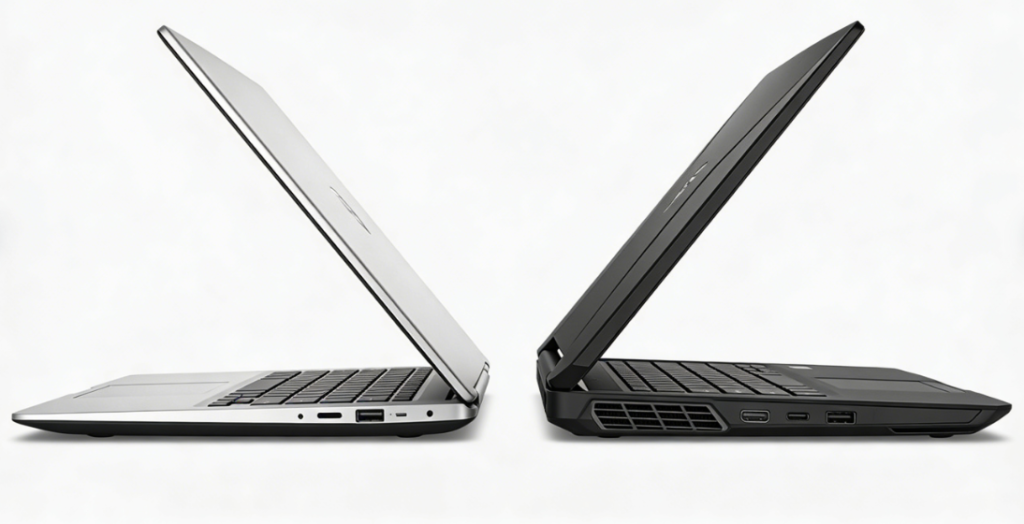
The global laptop market is projected to reach $238.7 billion by 2026, with Ultrabooks and gaming laptops emerging as the two fastest-growing segments. Ultrabooks hold 32% of the market—driven by remote work trends and 2026’s AI-enhanced, lightweight designs—while gaming laptops capture 28% share, fueled by demand for portable 3A gaming and high-performance content creation. Key players include ASUS (21% market share), Lenovo (19%), Dell (17%), and Apple (14%), each targeting distinct needs: Ultrabooks prioritize portability, all-day battery, and productivity, while gaming laptops focus on raw power, advanced cooling, and immersive displays.
Modern users increasingly seek “all-in-one” solutions, but 67% report frustration with compromises: Ultrabooks lacking enough gaming muscle or gaming laptops being too bulky for daily commutes. 2026 has narrowed this gap—Ultrabooks now offer AI-accelerated processors and discrete GPU options, while gaming laptops embrace slimmer designs and longer battery life. Yet core differences remain, making the choice dependent on how you balance work (productivity, portability, battery life) and play (3A gaming, content creation, multitasking). Below, we break down key technologies, top 2026 models, and practical guidance to help you choose wisely.
I. Core Technology: Key Differences & 2026 Innovations ⚙️
The divide between Ultrabooks and gaming laptops hinges on six foundational elements—processing power, graphics performance, display technology, battery efficiency, cooling systems, and portability. Here’s how 2026’s offerings stack up:
1. Processing Power: Efficiency vs. Raw Performance 🚀
| Category | Ultrabooks | Gaming Laptops |
| Processors | Intel Core Ultra 5/7 (Panther Lake, 18A process) or AMD Ryzen 7 Strix Point—10-14 cores, 15-28W TDP. ASUS ExpertBook B9 2026 uses the Core Ultra 7 375H (12 cores, 25W) for 3x faster multitasking than 2025 models—perfect for running Office apps, video calls, and browsers simultaneously. | Intel Core Ultra 9 386H or AMD Ryzen 9 8945HS—16-24 cores, 45-65W TDP. ROG Strix Scar 18 2026 features the Core Ultra 9 with 5.8GHz boost, optimized for 3A games and 8K video editing that demands maximum CPU power. |
| AI Capabilities | On-chip NPU (Neural Processing Unit) for productivity-focused tasks: real-time translation, video conferencing background blur, and smart battery optimization (extends runtime by 20% vs. 2025 models) for all-day work. | NPU + GPU AI acceleration (NVIDIA Tensor Cores)—supports DLSS 4.0 for game upscaling (4K quality from 1080p inputs) and AI-assisted content creation (e.g., auto-rendering in video editing, quick tweaks to 3D models) to cut workflow time. |
| Memory | 16GB-32GB LPDDR5X (6400MHz) for efficient multitasking—runs 10+ browser tabs, Office suites, and video calls without lag, ideal for remote work and light content creation. | 32GB-64GB DDR5 (5600MHz) for memory-intensive workloads: 3A games with large textures, 8K video editing, and 3D modeling that requires handling massive project files smoothly. |
2. Graphics Performance: Integrated vs. Discrete GPUs 🎨
- Ultrabooks: Intel Iris Xe Max or AMD Radeon 780M integrated graphics—handles light gaming (Stardew Valley, Minecraft) and 4K video playback seamlessly. Premium models (e.g., ROG Zephyrus G14 2026) add the RTX 5050 Max-Q (35W) for 1080p/60fps gaming in titles like Fortnite or Cyberpunk 2077 (low-mid settings)—great for casual gamers who don’t want to sacrifice portability.
- Gaming Laptops: NVIDIA RTX 5070 Ti/5090 or AMD Radeon 9070 XT discrete GPUs—135W-175W TDP, hardware ray tracing (for realistic lighting and shadows), and DLSS 4.0. ROG Phantom X 2026’s RTX 5090 delivers 4K/120fps in Cyberpunk 2077 (max settings) and blazingly fast 8K video rendering in Premiere Pro—perfect for hardcore gamers and professional creators.
3. Display Technology: Productivity vs. Immersion 🖥️
- Ultrabooks: 13-16 inch OLED screens (2.5K-2.8K, 60-120Hz)—100% P3 color gamut, ΔE accuracy (critical for photo/video editing), and 1100 nits brightness (visible outdoors or in bright offices). ASUS ExpertBook B9 2026’s display is Pantone Validated, ensuring consistent color reproduction for design work and client presentations.
- Gaming Laptops: 15-18 inch IPS/OLED panels (2.5K-4K, 165-240Hz)—0.2ms response time (eliminates motion blur in fast-paced games like CS2 or Valorant), G-SYNC (syncs display with GPU to prevent screen tearing), and VESA DisplayHDR True Black 1000 certification (deep blacks for immersive gaming worlds). ROG Flow X16 2026 adds a secondary touchscreen for game controls or editing timelines.
4. Battery Life: All-Day Use vs. Performance Tradeoffs ⚡
- Ultrabooks: 60Wh-80Wh batteries with 8-14 hours of productivity use. ASUS ExpertBook B9 2026’s 68Wh battery lasts 14 hours on web browsing, 8 hours on video conferencing, and 4 hours on light gaming. Supports 65W fast charging (50% in 30 minutes, full charge in 90 minutes) via USB-C—no need to carry a bulky adapter.
- Gaming Laptops: 70Wh-99Wh batteries with 3-6 hours of web browsing, 1-2 hours of gaming (max settings). Lenovo Legion Pro 9i 2026’s 99Wh battery offers 5 hours of productivity (document work + browser tabs) and 1.5 hours of 4K gaming. Requires 180W-330W chargers (bulkier than Ultrabook adapters, but some support 100W USB-C fast charging for travel).
5. Cooling & Portability: Thin-and-Light vs. Power-Focused ❄️
- Ultrabooks: 1.0-1.6cm thickness, 1.1-1.9kg weight—easy to slip into a backpack or carry-on for daily commutes or business trips. Uses slim cooling solutions (vapor chamber or low-noise fans) or passive cooling (e.g., Apple MacBook Air M3’s silent operation for low TDP chips), making them quiet in offices or cafes.
- Gaming Laptops: 1.5-2.5cm thickness, 2.3-3.5kg weight—manageable for occasional travel but bulky for daily commutes. Features advanced cooling systems (ROG’s Glacier 3.0: dual fans, 8 heat pipes, liquid metal thermal paste) to handle high GPU/CPU temperatures without throttling (performance drops during extended gaming sessions).
II. Top 2026 Models: Ultrabooks vs. Gaming Laptops 🏆
A. Best Ultrabooks for Work & Light Play ✨
1. ASUS ExpertBook B9 2026 (Best for Business) 💼
- Specs: 14-inch 2.8K OLED (120Hz, 100% P3), Intel Core Ultra 7 375H, 32GB LPDDR5X, 2TB PCIe 5.0 SSD, 68Wh battery (14 hours), 1.1kg, 1.0cm thickness.
- Key Features: MIL-STD-810H military-grade durability (resists drops and dust), TUV eye protection (reduces blue light for long workdays), 5G connectivity (works without WiFi), AI noise cancellation for crystal-clear video calls.
- Price: $1,799.99.
- Pros: Ultra-lightweight (feels weightless in a laptop bag), enterprise security (fingerprint scanner + TPM 2.0), all-day battery (no need to carry a charger), fast SSD for quick file access.
- Cons: No discrete GPU (only light gaming possible), limited port selection (focused on slim design).
- Best For: Business travelers, remote workers, and productivity-focused users who prioritize portability and reliability over gaming.
2. ROG Zephyrus G14 2026 (Best Ultrabook for Gaming) 🎮
- Specs: 14-inch 2.5K OLED (165Hz), Intel Core Ultra 9 386H, 32GB LPDDR5X, 2TB SSD, RTX 5050 Max-Q (35W), 76Wh battery (8 hours), 1.57kg, 1.59cm.
- Key Features: ROG Nebula Display (optimized for gaming colors and contrast), 6-speaker Dolby Atmos sound system, AniMe Matrix LED display (customizable lighting for personalization).
- Price: $2,199.99.
- Pros: Balances portability and gaming (1080p/60fps for 3A titles), premium aluminum build (resists scratches), fast charging (65W USB-C), quiet cooling (no loud fan noise during work).
- Cons: More expensive than pure Ultrabooks, battery life shorter than business-focused models.
- Best For: Gamers who travel, content creators (video/photo editing), and users wanting “one laptop for all” (work meetings + evening gaming sessions).
3. Apple MacBook Air M3 2026 (Best for macOS Ecosystem) 🍎
- Specs: 13.6-inch Liquid Retina OLED (120Hz), Apple M3 Pro (12-core), 32GB RAM, 2TB SSD, 72Wh battery (13 hours), 1.15kg, 1.1cm.
- Key Features: macOS Sonoma (seamless app integration), MagSafe 3 (safe charging, no cable snags), Thunderbolt 5 (fast external device connectivity), 16-core Neural Engine (AI productivity boosts).
- Price: $1,999.99.
- Pros: Silent operation (passive cooling), seamless Apple ecosystem integration (works with iPhone/iPad/Apple Watch), stunning OLED display (vibrant colors for design work), long battery life.
- Cons: Limited game compatibility (fewer 3A titles optimized for macOS), no official Windows dual-boot support.
- Best For: Apple users, designers (graphic/video/UI), and those prioritizing macOS-exclusive productivity tools (Final Cut Pro, Logic Pro).
B. Best Gaming Laptops for Play & Heavy Work 🎯
1. ROG Strix Scar 18 2026 (Best for 4K Gaming) 🖥️
- Specs: 18-inch 4K OLED (165Hz), Intel Core Ultra 9 386H, 64GB DDR5, 4TB PCIe 5.0 SSD, RTX 5090 (175W), 99Wh battery (4 hours), 2.8kg.
- Key Features: Glacier 3.0 cooling (keeps temps low during 4K gaming), per-key RGB keyboard (customizable lighting for gaming setups), 3x Thunderbolt 5 ports (connect external monitors/SSDs), Hi-Res audio certification.
- Price: $3,499.99.
- Pros: Desktop-grade performance (4K/120fps gaming, 8K video editing), future-proof specs (64GB RAM + 4TB SSD), large 18-inch display (replaces a separate monitor), durable build.
- Cons: Heavy (feels bulky in travel bags), short battery life (needs charger for all-day use), large power adapter (takes up space).
- Best For: Hardcore gamers, professional content creators (8K video/3D modeling), and power users who prioritize performance over portability.
2. Lenovo Legion Pro 9i 2026 (Best Value Gaming Laptop) 💰
- Specs: 16-inch 2.5K IPS (240Hz), Intel Core Ultra 7 380H, 32GB DDR5, 2TB SSD, RTX 5070 Ti (140W), 99Wh battery (5 hours), 2.4kg.
- Key Features: ColdFront 6.0 cooling (quiet operation for work), Legion AI Engine (auto-tunes performance for work/gaming), Windows 11 Pro (business-friendly), expandable RAM/SSD (upgradable to 64GB/8TB).
- Price: $2,299.99.
- Pros: Great performance-to-price ratio (half the cost of flagship gaming laptops), durable plastic chassis (resists wear), quiet fans (usable in home offices), long battery for a gaming laptop.
- Cons: IPS display less vibrant than OLED (fine for gaming, less ideal for design), bulkier than Ultrabooks.
- Best For: Budget-conscious gamers, content creators (4K video editing), and students (classes + weekend gaming sessions).
3. ASUS ROG Phantom X 2026 (Best Premium Gaming Laptop) ✨
- Specs: 16-inch 4K OLED (120Hz), Intel Core Ultra 9 386H, 64GB DDR5, 4TB SSD, RTX 5090 (175W), 99Wh battery (3.5 hours), 2.3kg.
- Key Features: CNC-machined aluminum chassis (premium look/feel), 35-segment light matrix (dynamic lighting effects), 8-speaker Dolby Atmos (theater-like audio), slim design for a gaming laptop (1.8cm thickness).
- Price: $3,999.99.
- Pros: Ultra-slim for a gaming laptop (fits in most backpacks), premium 4K OLED display (great for gaming + design), top-tier performance (no lag in 3A games/heavy software), quiet cooling.
- Cons: Very expensive, limited battery life (best for plugged-in use).
- Best For: Enthusiasts, professional gamers/streamers, and creative professionals who want a premium, slim gaming laptop for work and play.
III. Recommendations by Usage Scenario 🎭
1. Remote Workers & Frequent Travelers ✈️
- Top Pick: ASUS ExpertBook B9 2026 + Portable USB-C Monitor
- Why: Ultra-lightweight (1.1kg) for carry-on luggage (no back strain), 14-hour battery for all-day meetings (from airport to client office), and enterprise security features (protects sensitive work data). The OLED display ensures clear video calls and eye comfort during long workdays; the portable monitor adds screen real estate for multitasking (e.g., Excel + video conferencing).
2. Gamers Who Travel Occasionally 🎮
- Top Pick: ROG Zephyrus G14 2026 + 100W Portable Charger
- Why: Balances 1080p/60fps gaming (RTX 5050 Max-Q) with 8-hour battery life (enough for work trips + evening gaming in hotels). Weighs 1.57kg—manageable for weekend trips—and supports fast charging via USB-C (the portable charger fits in a small bag, no need for the bulky stock adapter).
3. Content Creators (Video Editing, 3D Modeling) 🎨
- Top Pick: Lenovo Legion Pro 9i 2026 + Wacom Intuos Pro
- Why: RTX 5070 Ti accelerates Premiere Pro, Blender, and Photoshop (cuts rendering time by 50% vs. Ultrabooks), 32GB RAM handles large project files + multitasking (browser + editing software + plugins), and the 240Hz display is great for timeline editing (smooth scrubbing). Better value than Ultrabooks with discrete GPUs (saves $500+ for similar performance).
4. Students (Classes + Casual Gaming) 📚
- Top Pick: ASUS ExpertBook B9 2026 (Ultrabook) or Lenovo Legion Pro 9i (Gaming Laptop)
- Why: ASUS offers 14-hour battery for classes (no need to hunt for outlets), 120Hz OLED for casual gaming (Minecraft, Valorant), and a lightweight design (1.1kg) for campus commutes—priced at $1,799.99 (budget-friendly). Lenovo delivers better gaming performance (RTX 5070 Ti) for weekend sessions (e.g., Cyberpunk 2077) and expandable specs (upgrade RAM/SSD later) if budget allows.
5. Home Users (No Travel, Work + Gaming) 🏠
- Top Pick: ROG Strix Scar 18 2026 + Ergonomic Laptop Stand
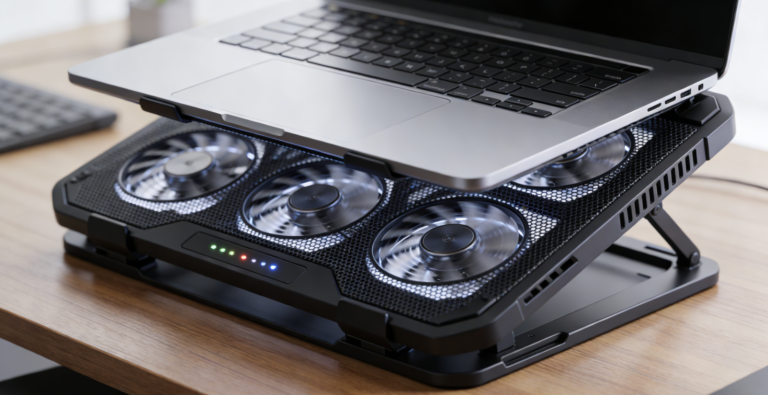
- Why: Desktop-grade performance for 4K gaming (RTX 5090) and heavy work (e.g., 8K video editing, data analysis). The 18-inch 4K OLED display replaces a separate monitor (saves desk space), and the ergonomic stand improves cooling (prevents overheating during long sessions) + reduces neck strain (adjustable height).
IV. How to Choose: Key Factors to Consider 🛒
1. Prioritize Your Primary Use Case
- Work > Play (80/20): Choose an Ultrabook—prioritize battery life (8+ hours), portability (under 2kg), and display color accuracy (OLED/100% P3) for design/work tasks (e.g., ASUS ExpertBook B9).
- Play > Work (80/20): Opt for a gaming laptop—focus on GPU performance (RTX 5070 Ti+), cooling system (advanced heat pipes/fans), and high-refresh display (165Hz+) for smooth gaming (e.g., ROG Strix Scar 18).
- 50/50 Split: Go for a “hybrid” Ultrabook (e.g., ROG Zephyrus G14) or slim gaming laptop (e.g., ASUS ROG Phantom X)—balances portability and performance without extreme compromises.
2. Evaluate Portability Needs
- Daily Commute/Travel: Ultrabook (1.1-1.9kg) – gaming laptops (2.3kg+) will strain your back over time, and their bulky chargers take up valuable bag space.
- Home/Office Only: Gaming laptop – weight doesn’t matter, and you’ll benefit from superior performance for gaming and heavy work (no need to sacrifice power).
3. Set a Realistic Budget
- 1,000−1,800: Mid-range Ultrabooks (ASUS ExpertBook B9, $1,799) or budget gaming laptops (Lenovo Legion 5i, $1,299)—great for casual users/students.
- 1,800−3,000: Premium Ultrabooks (MacBook Air M3, $1,999) or mid-range gaming laptops (Lenovo Legion Pro 9i, $2,299)—ideal for professionals/content creators.
- **LaTex error2,199) or high-end gaming laptops (ROG Strix Scar 18, $3,499)—for enthusiasts and power users who want top-tier specs.
4. Check for Essential Features
- Work: Keyboard comfort (full-size layout, backlit for low-light offices), USB-C/Thunderbolt ports (connect external monitors/drives), webcam quality (1080p+ for video calls), and enterprise security (fingerprint/TPM 2.0).
- Gaming: GPU (RTX 5070 Ti+ for 4K gaming), cooling system (prevents throttling), display refresh rate (165Hz+ for fast-paced games), and audio (stereo speakers with bass or headphone jack for headsets).
5. Avoid Common Mistakes
- Overpaying for Performance: Casual gamers don’t need an RTX 5090—RTX 5050 Max-Q in an Ultrabook suffices for Fortnite or Minecraft. Save money by choosing a mid-range GPU.
- Sacrificing Battery for Power: Remote workers should avoid gaming laptops with 1-2 hour battery life—you’ll be stuck near an outlet all day, defeating the purpose of a laptop.
- Ignoring Display Quality: Content creators need OLED/100% P3 displays—IPS panels in budget gaming laptops may lack color accuracy, ruining photo/video edits.
- Forgetting Upgradeability: Gaming laptops often have removable RAM/SSD for future upgrades (e.g., add 64GB RAM later), while most Ultrabooks have soldered components (can’t upgrade)—choose based on long-term needs.
Conclusion
In 2026, the choice between an Ultrabook and a gaming laptop boils down to balance: Ultrabooks excel at portability, battery life, and productivity, while gaming laptops dominate in raw performance, gaming, and content creation. ASUS ExpertBook B9 is the top pick for remote workers and travelers, ROG Strix Scar 18 reigns for hardcore gamers and power users, and ROG Zephyrus G14 bridges the gap for those wanting work-play versatility.
The key to satisfaction is aligning hardware with your lifestyle: if you travel frequently and game casually, an Ultrabook with discrete GPU is ideal; if you stay home and need 4K gaming or 8K editing, a gaming laptop delivers unmatched performance. As technology advances—with Ultrabooks gaining more GPU power and gaming laptops slimming down—the line between the two continues to blur. However, their core identities remain: Ultrabooks are built for moving through work and life, while gaming laptops are built for dominating play and heavy tasks.
By focusing on your primary use case, portability needs, and budget, you’ll find a laptop that doesn’t force compromises—whether you’re closing deals on a flight, editing videos at a café, or conquering virtual worlds from your desk. The best laptop for work and play is the one that fits your unique rhythm, not just the latest specs.
About the Author