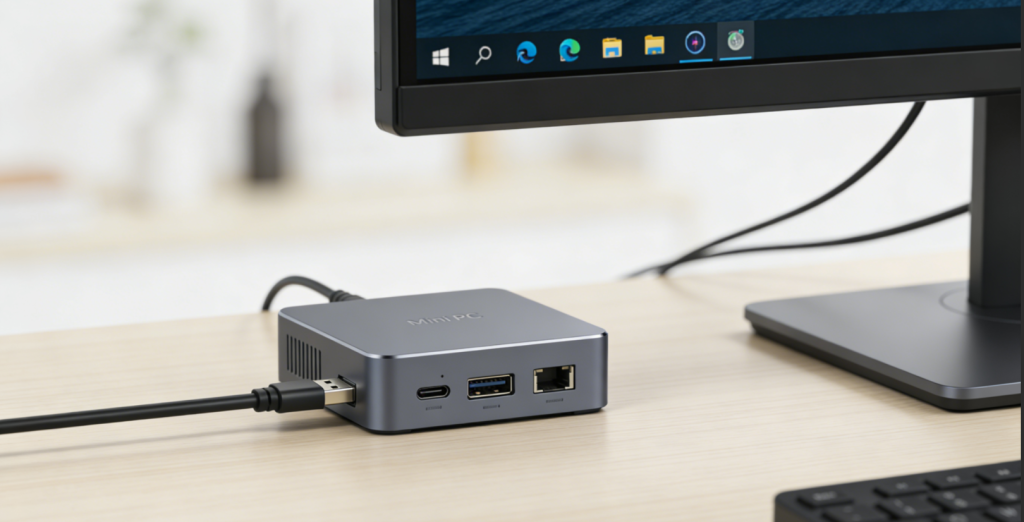
The global mini PC market is experiencing explosive growth, valued at 7.69 billion by 2032 with a CAGR of 6.2%. This surge is driven by the rising demand for space-saving, energy-efficient computing solutions—fueled by remote work adoption, small business digitization, and smart home integration. In 2026, high-performance mini PCs account for 58% of market share, with key players including Minisforum (global market leader), Lenovo, ASUS, Jumper, and Xuanpai capturing over 70% of global revenue. AI optimization, modular expandability, and 4K-capable graphics are emerging as top trends, with 52% of users prioritizing performance over size alone.
2026 marks a transformative year for mini PC innovation: AMD Ryzen 8000U/H and Intel 14th Gen processors deliver desktop-class performance in palm-sized chassis, USB4 connectivity enables universal peripheral integration, and advanced cooling systems unlock sustained power output. Users face distinct tradeoffs: home office workers prioritize multi-display support and storage expandability, while small businesses seek reliability and network versatility. Below, we break down core technologies, top 2026 models, and tailored guidance to help you find the perfect mini PC for your home or office workflow.
I. Core Technology: Key Innovations & 2026 Breakthroughs ⚙️
Mini PCs redefine compact computing by combining robust hardware with space-efficient design, anchored by five defining technologies—processing platforms, memory/storage, connectivity, thermal management, and smart features. Here’s how 2026’s offerings elevate these essentials:
1. Processing Platforms: Performance & Efficiency 🚀
| Processor Type | Intel Core (13th/14th Gen) | AMD Ryzen 7000/8000 Series | ARM (Raspberry Pi/Qualcomm) |
| Key Traits | 4-10 cores, 3.0-5.4GHz boost, Iris Xe graphics | 6-8 cores, 3.3-4.9GHz boost, Radeon 700M iGPU (RDNA 3) | 4-8 cores, 1.8-3.0GHz, power-efficient (5-15W TDP) |
| Examples | Intel NUC 14 Pro, Lenovo IdeaCentre Mini 5i | Minisforum K6, Lenovo Lecoo MINI PRO | Raspberry Pi 5, ASUS ExpertCenter PN54 (ARM variant) |
| Best For | Windows productivity, light gaming | Multitasking, content creation, 1080P gaming | Linux projects, smart home hubs, budget users |
| Pros | Stable Windows optimization, broad software support (e.g., Office, Adobe Suite) | Superior iGPU performance (great for video editing/light gaming), better multi-core efficiency for multitasking | Ultra-low power consumption (10-30W, cuts electricity bills), silent operation (no fan noise) |
| Cons | Higher TDP (15-35W, slightly more power-hungry), pricier than ARM alternatives | Limited Linux compatibility for some models | Less powerful for heavy workloads (4K video editing, 3A games), limited Windows support |
2. Memory & Storage: Speed & Expandability 📶
- Memory (RAM) Technologies:
- DDR5 SO-DIMM: 5600MHz+ clock speeds, dual-channel support (up to 64GB total), ideal for multitasking (e.g., 20+ browser tabs + Excel + Zoom) – stands out in models like the Xuanpai Chuangshi Mofang.
- DDR4 SO-DIMM: 3200MHz speeds, max 32GB capacity, budget-friendly option for casual use – a top pick for devices like the Jumper R78S.
- LPDDR5: Soldered design (16-32GB), power-efficient for ultra-compact models (e.g., Intel NUC 14 Pro) – saves space but cannot be upgraded.
- Storage Solutions:
- NVMe PCIe 4.0 SSD: 2280 form factor, read speeds up to 7GB/s (fast boot/load times), dual-slot support for extra storage – offered by flexible models like the Minisforum K6.
- SATA SSD: Budget alternative (500MB/s speeds), compatible with older mini PC models – great for basic document storage.
- MicroSD Expansion: Supplementary storage (up to 2TB) for ARM-based systems (e.g., Raspberry Pi 5) – easy to add extra space for media files.
- 2026 Innovations: Hot-swappable SSD bays (high-end models) – swap storage without shutting down, and AI-driven memory allocation (optimizes RAM usage for open apps, reducing lag).
3. Connectivity: Versatile & Future-Proof 🔗
- Wireless Connectivity:
- Wi-Fi 6E (802.11ax): 3x faster than Wi-Fi 5, 6GHz band support (less interference), low latency – critical for stable video calls and large file downloads (standard on 2026 mid-range+ models).
- Bluetooth 5.2/5.4: Multi-device pairing (up to 8 devices), 30m range – connect wireless keyboards, mice, printers, and headphones simultaneously.
- Wired Interfaces:
- USB4 Type-C: 40Gbps transfer speeds, DisplayPort 2.0 output (supports 4K/120Hz monitors), charging support – models like the Lenovo Lecoo MINI PRO feature dual USB4 ports for enhanced versatility.
- HDMI 2.1: 4K@120Hz or 8K@60Hz video output – devices like the Xuanpai Chuangshi Mofang unlock high-refresh 4K for gaming/design work.
- 2.5G Ethernet: Dual ports on premium models (e.g., Minisforum K6) for network redundancy – perfect for small businesses needing stable internet.
- OcuLink: External GPU (eGPU) support – the Xuanpai Chuangshi Mofang allows creative professionals to add a dedicated GPU for 3D rendering/4K editing.
- Legacy Ports: USB 3.2 Gen2 (Type-A), 3.5mm audio jack, and microSD readers – backward compatibility for older peripherals (e.g., USB printers, external hard drives).
4. Thermal Management: Sustained Performance ❄️
- Cooling Systems:
- Dual-Turbo Fans: High-airflow design with 79-97 fin heat sinks (e.g., Lenovo Lecoo MINI PRO) – keeps the CPU cool during long work sessions.
- Copper Heat Pipes: 2-3 heat pipes for efficient heat dissipation (e.g., Minisforum K6) – prevents performance throttling when editing videos or multitasking.
- Phase-Change Thermal Material: Reduces CPU temperatures by 15-20°C (e.g., Xuanpai Chuangshi Mofang) – ideal for high-performance tasks.
- Performance Modes:
- Silent Mode (15-25W TDP): For office tasks (email, document editing), near-silent operation – won’t disturb others in home offices.
- Performance Mode (50-80W TDP): Boosted clock speeds for gaming/content creation – the Xuanpai Chuangshi Mofang’s 80W mode handles 1080P games smoothly.
- 2026 Innovations: AI-powered adaptive cooling (adjusts fan speed based on workload – quiet when idle, powerful when busy) and vapor chamber technology (premium models) – better heat spread for sustained performance.
5. Smart Features: Beyond Basic Computing 🧠
- Customization & Security:
- BIOS Reset Button: One-touch system recovery (e.g., Lenovo Lecoo MINI PRO) – fixes software issues without technical expertise.
- Fingerprint Sensors: Secure login (e.g., Xuanpai Chuangshi Mofang) – keeps work files safe from unauthorized access.
- Software Integration: Lenovo Vantage, Minisforum Control Center – easy performance tuning (switch modes, monitor temperatures) for non-technical users.
- Enhanced Functionality:
- RGB Lighting: Customizable LED rings (e.g., Xuanpai Chuangshi Mofang) – adds aesthetic appeal to home setups.
- Multi-Display Support: Up to 4 monitors via USB4/HDMI/DP – ideal for traders (stock charts) or designers (toolbars + canvas).
- Power Efficiency: 10-35W TDP (30-60% lower than traditional desktops) – reduces electricity costs, especially for 24/7 use (e.g., small business servers).
II. Top 2026 Mini PCs: For Every Home & Office Need 🏆
A. Best for Home Office Professionals 💼
1. Minisforum K6 (Best All-Rounder) 🌟
- Specs: AMD Ryzen 7 7840HS (8C/16T), 32GB DDR5 5600MHz, 1TB NVMe SSD, 128.8x127x47.8mm (palm-sized), 2.5G Ethernet x2, Wi-Fi 6E.
- Key Features: Radeon 780M iGPU (12CU, 2700MHz), USB4 Type-C, HDMI+DP output, dual-fan cooling, Windows 11 Pro.
- Price: $649.99.
- Pros: Exceptional multitasking performance (handles Zoom + Excel + Photoshop simultaneously), silent cooling (won’t disrupt video calls), versatile ports (connect dual monitors + peripherals), compact design (fits small home office desks).
- Cons: No eGPU support, pricier than entry-level models – but worth it for full-time remote work.
- Best For: Remote workers, content creators, and professionals running productivity software (Excel, Photoshop, Zoom) for 8+ hours daily.
2. Lenovo Lecoo MINI PRO (Best Value for Multitasking) 💰
- Specs: AMD Ryzen 7 8745H (8C/16T), 16GB DDR5 5600MHz, 1TB NVMe SSD, 131.5×138.5×52.1mm, dual 2.5G Ethernet.
- Key Features: 70W performance mode, Radeon 780M iGPU, USB4 Type-C x2, HDMI 2.1, BIOS reset button, aluminum chassis.
- Price: $310.00 (after rebates).
- Pros: Outstanding value (high performance at a mid-range price), robust aluminum build (durability for daily use), multi-display support (up to 3 monitors), expandable RAM (up to 64GB – future-proofs for heavier tasks).
- Cons: No fingerprint sensor, basic RGB lighting – but irrelevant for focus-driven workspaces.
- Best For: Home office users needing reliable performance for video calls, document editing, and light design work without overspending.
B. Best for Small Businesses 🏢
1. Intel NUC 14 Pro (Best Enterprise-Grade) 🏆
- Specs: Intel Core i7-1460P (12C/16T), 32GB LPDDR5, 2TB NVMe SSD, 117x112x37mm (ultra-compact), vPro support, Wi-Fi 6E.
- Key Features: Intel Iris Xe graphics, Thunderbolt 4, HDMI 2.1, 2.5G Ethernet, hardware-level security (TPM 2.0).
- Price: $1,199.99.
- Pros: Enterprise reliability (24/7 operation safe), remote management tools (IT teams can troubleshoot from anywhere), ultra-compact design (fits behind monitors/reception desks), low power consumption (15-28W – cuts energy bills).
- Cons: Premium price, soldered RAM (non-upgradable) – but ideal for businesses prioritizing stability over customization.
- Best For: Small businesses, server deployments, and IT teams requiring secure, manageable systems for offices or point-of-sale setups.
2. ASUS ExpertCenter PN54 (Best for Networked Offices) 🌐
- Specs: AMD Ryzen 5 7535U (6C/12T), 16GB DDR5, 512GB NVMe SSD, 119x119x36mm, dual-band Wi-Fi 6E, Bluetooth 5.4.
- Key Features: HDMI 2.1 + USB4 output, 2.5G Ethernet, VESA mount compatibility (fits behind monitors), dust-resistant design.
- Price: $499.99.
- Pros: Space-saving (eliminates desk clutter), stable network connectivity (Wi-Fi 6E + 2.5G Ethernet for file sharing), quiet operation (non-intrusive in open offices), broad OS support (Windows/Linux – works with business software).
- Cons: Limited storage expansion (single M.2 slot), lower iGPU performance – but sufficient for office tasks (email, spreadsheets, CRM tools).
- Best For: Reception desks, point-of-sale systems, and office workstations requiring 24/7 reliability and minimal footprint.
C. Best for Budget-Conscious Users 💰
1. Raspberry Pi 5 (Best Entry-Level) 🥧
- Specs: Broadcom BCM2712 (4C/4T), 8GB LPDDR4X, 128GB microSD, 110x80x22mm (credit card-sized), Wi-Fi 5, Bluetooth 5.0.
- Key Features: 4Kp60 HDMI output, USB 3.0 ports, GPIO pins for DIY projects, Raspberry Pi OS (Linux-based).
- Price: $120.00 (with 8GB RAM).
- Pros: Extremely affordable (fits student/hobbyist budgets), energy-efficient (5-10W – negligible electricity costs), modular (GPIO pins for smart home projects), ideal for learning/prototyping (great for small business startups testing software).
- Cons: Limited Windows support, less powerful for heavy tasks – but perfect for basic computing needs.
- Best For: Students, hobbyists, and casual users needing a basic PC for web browsing, document editing, media streaming, or small business prototyping.
2. Jumper R78S (Best Budget Performance) 🚀
- Specs: AMD Ryzen 7 8745H (8C/16T), 16GB DDR5, 512GB NVMe SSD, 150x150x59.5mm, Wi-Fi 6, Bluetooth 5.2.
- Key Features: Radeon 780M iGPU, USB4 Type-C, HDMI+DP output, dual Ethernet ports, leather-accented chassis.
- Price: $299.00 (after rebates).
- Pros: Unbeatable performance for the price (8-core CPU handles multitasking), expandable RAM/storage (upgrades without replacing the whole PC), supports 1080P gaming (casual breaks for employees), dual Ethernet (stable for small office networks).
- Cons: Bulkier than premium models, plastic build – but durable enough for daily use.
- Best For: Budget users needing a powerful mini PC for work, study, and casual gaming without exceeding $300.
D. Best for Home Entertainment & Creatives 🎮🎨
1. Xuanpai Chuangshi Mofang (Best for Gaming & Design) 🎮
- Specs: AMD Ryzen 7 8845H (8C/16T), 32GB DDR5 5600MHz, 2TB NVMe SSD, 150x150x49.5mm, Wi-Fi 6E.
- Key Features: 80W performance mode, Radeon 780M iGPU, OcuLink eGPU support, HDMI 2.1 + DP 2.0, RGB light ring.
- Price: $410.00 (after rebates).
- Pros: Top-tier iGPU performance (runs 1080P 3A games like Fortnite or Cyberpunk 2077 smoothly), eGPU expandability (add a dedicated GPU for 4K editing/3D rendering), premium metal chassis (sturdy for creative workflows), fingerprint sensor (secure access to project files).
- Cons: Larger than other mini PCs, noisy in performance mode – but acceptable for gaming/design sessions.
- Best For: Gamers, video editors, and 3D designers seeking compact power for home entertainment or creative projects.
III. Scenario-Based Recommendations 🎭
1. Remote Workers (8+ Hours Daily Productivity) 💼
- Top Pick: Minisforum K6 + Dual 27” 4K Monitors + Wireless Keyboard/Mouse
- Why: The Ryzen 7 7840HS handles multitasking (20+ browser tabs, Excel, Zoom) effortlessly – no lag during back-to-back meetings. Dual 4K monitors boost workflow efficiency (e.g., edit documents on one screen, video call on the other), and Wi-Fi 6E ensures stable connectivity. The compact design saves desk space for other essentials (notebooks, coffee mug!).
2. Small Business Teams (Networked Workstations) 🏢
- Top Pick: Intel NUC 14 Pro (x5) + Network Attached Storage (NAS) + VESA Mounts
- Why: vPro support lets IT teams manage all 5 PCs remotely (no need for on-site troubleshooting), while the ultra-compact design fits behind monitors (reduces office clutter). 2.5G Ethernet syncs seamlessly with NAS for shared files (e.g., client documents, project folders), and low power consumption cuts monthly energy costs for 24/7 operation.
3. Budget Users & Students (Study + Casual Use) 📚
- Top Pick: Jumper R78S + 24” Monitor + Budget Wireless Combo
- Why: The Ryzen 7 processor delivers enough power for online classes, essay writing, and streaming – no compromise on performance for $300. Expandable RAM (up to 64GB) future-proofs the system for graduate studies or side hustles (e.g., freelance design). Dual Ethernet ports add stability for online exams or video lectures.
4. Home Entertainment Enthusiasts (4K Streaming + Gaming) 🎬
- Top Pick: Xuanpai Chuangshi Mofang + 4K HDR TV + Wireless Controller
- Why: Radeon 780M iGPU streams 4K content smoothly (Netflix, Disney+) and runs 1080P games at playable framerates. HDMI 2.1 supports 4K@120Hz for immersive gaming, and the RGB light ring adds ambient lighting for movie nights. The 2TB NVMe SSD stores dozens of games and 4K videos locally – no buffering or storage shortages.
5. Creative Professionals (Video Editing + 3D Design) 🎨
- Top Pick: Xuanpai Chuangshi Mofang + OcuLink eGPU + Color-Accurate Monitor
- Why: The Ryzen 7 8845H handles 1080P video editing (Premiere Pro, DaVinci Resolve) natively, while the OcuLink port supports external GPUs (e.g., RTX 4070) for 3D rendering or 4K editing. Dual NVMe slots let you store large project files and raw footage locally – no slow external drives. The color-accurate monitor ensures your designs look perfect on client screens.
IV. How to Choose: Key Factors for Every User 🛒
1. Define Your Primary Use Case
- Home Office: Prioritize multi-core processors (6+ cores), 16GB+ RAM (for multitasking), and multi-display support (HDMI/USB4) – handle video calls, documents, and design work simultaneously.
- Small Business: Focus on enterprise features (vPro, TPM 2.0), remote management, and 24/7 reliability – minimize downtime for customer-facing operations.
- Budget Users: Opt for AMD Ryzen 5/7 or Raspberry Pi models with 8GB RAM and 512GB+ storage – basic computing without overspending.
- Creatives/Gamers: Seek 8-core processors, Radeon 780M/iGPU or eGPU support, and PCIe 4.0 storage – power for editing/gaming in a compact form.
2. Choose the Right Processor
- Intel Core: Best for Windows productivity, enterprise software (e.g., CRM tools), and light gaming – stable and widely compatible.
- AMD Ryzen: Superior multi-core performance and iGPU capabilities – ideal for content creation, multitasking, and casual gaming.
- ARM: Ultra-low power consumption – great for Linux projects, smart home hubs, and casual use (web browsing, streaming).
3. Set a Realistic Budget
- $100-$300: Entry-level (Raspberry Pi 5, Jumper R78S) – perfect for students, hobbyists, and budget-conscious small businesses.
- $300-$700: Mid-range (Lenovo Lecoo MINI PRO, Minisforum K6) – best for home offices and small businesses needing reliable performance.
- $700+: Premium (Intel NUC 14 Pro, Xuanpai Chuangshi Mofang with eGPU) – ideal for professionals and enterprises prioritizing stability and power.
4. Must-Have Features
- All Users: Wi-Fi 6/6E (stable connectivity), Bluetooth 5.2+ (wireless peripherals), HDMI 2.0+ (4K support), and at least one USB-C port (future-proof).
- Home Office: 16GB+ RAM, 512GB+ NVMe SSD (fast load times), and dual-display support (multitasking).
- Small Business: TPM 2.0 (security), 2.5G Ethernet (stable network), and remote management tools (IT efficiency).
- Creatives: PCIe 4.0 storage (fast file access), eGPU support (OcuLink/Thunderbolt), and high-performance iGPU/CPU (editing/gaming).
5. Avoid Common Mistakes
- Ignoring Expandability: Ensure RAM/storage are upgradable (SO-DIMM slots, dual M.2 slots) unless you’re sure you won’t need more power later – saves money on replacing the whole PC.
- Sacrificing Ports: Don’t skimp on USB4/Thunderbolt – they enable future peripherals (eGPUs, 8K monitors) and multi-display setups.
- Overlooking Cooling: For performance tasks (editing/gaming), choose models with dual fans or copper heat pipes – avoid throttling (slowdowns) during long sessions.
- Neglecting Power Consumption: If using 24/7 (e.g., servers), prioritize low TDP (15-25W) – reduces electricity costs significantly.
- Forgetting Accessories: Budget for VESA mounts (save space), external monitors, and wireless peripherals – a complete setup enhances productivity.
Conclusion
2026’s mini PCs have evolved from niche devices to versatile workhorses, blending desktop-class performance with space-saving design. The Minisforum K6 excels as an all-around choice for home offices, the Intel NUC 14 Pro leads for enterprise reliability, and the Jumper R78S offers unbeatable value for budget users.
The key to choosing wisely lies in aligning processing power, expandability, and connectivity with your workflow: remote workers benefit from multi-core CPUs and dual-display support; small businesses need security and manageability; and creatives prioritize iGPU/eGPU capabilities. As AMD Ryzen 8000 series and Wi-Fi 6E become standard, mini PCs will continue to redefine home and office computing—turning cramped desks into clutter-free workspaces and small businesses into efficient digital hubs.
Whether you’re working from a home office, managing a small team, or building a budget setup, the best mini PC is the one that adapts to your needs. By focusing on your use case, budget, and must-have features, you’ll find a compact computer that doesn’t just replace traditional desktops—it enhances productivity, saves space, and delivers the power you need, wherever you work.
About the Author